Chrome Extension · Free to Install

Audit any page in Chrome
and fix SEO issues faster

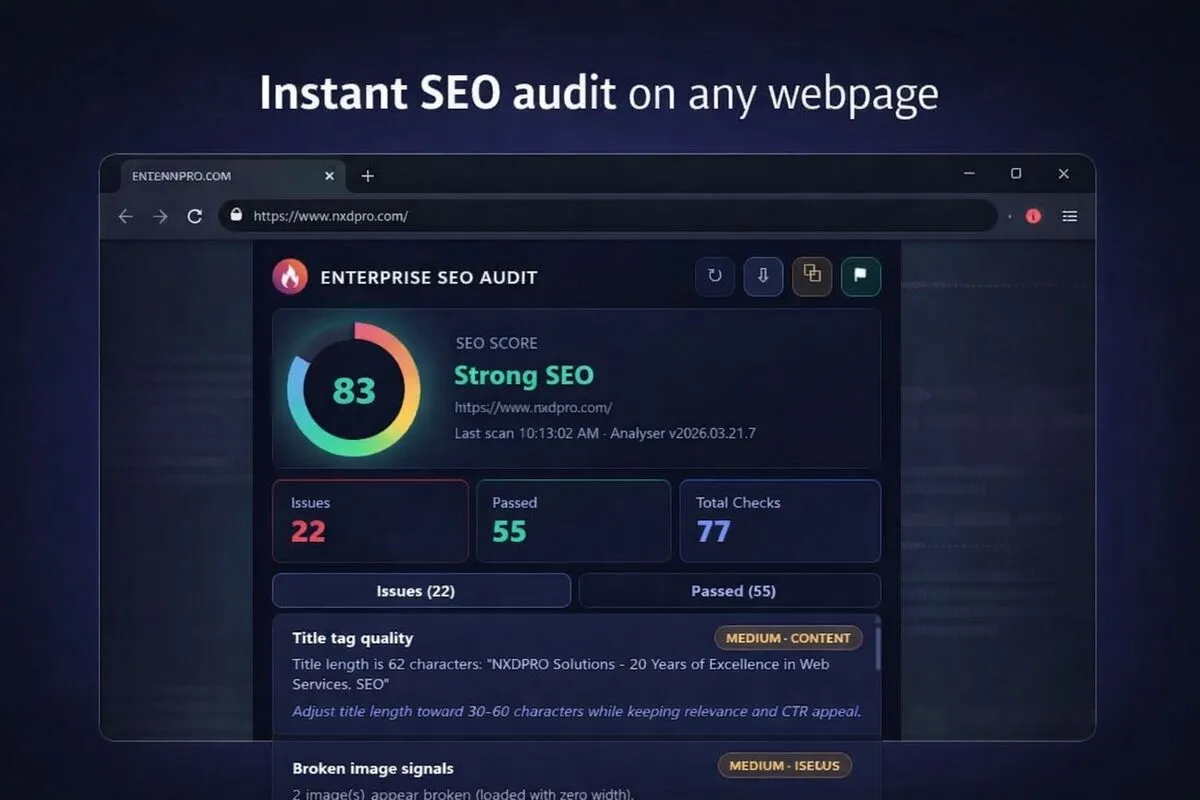
Run 80+ SEO checks in seconds right inside Chrome — including the pages no cloud crawler can reach: localhost, staging sites, and pages behind a login. The audit runs in the tab you are already signed in to. Use the free extension for fast page audits, then unlock Pro when you want PDF exports, saved history, projects, and scheduled scans in the web app.

SEO Auditor in action showing 80+ SEO checks with score ring and issue breakdown

Free vs Pro

Start free for instant page checks. Upgrade only when you want deeper workflows and saved history.

Free Start Free
  • 30+ on-page SEO checks
  • Clear score ring and issue summary
  • Heading hierarchy analysis
  • Meta tags, canonicals, and social previews
  • Image alt text checks
  • Internal link and page structure review
  • Instant results inside Chrome
Pro Pro Workflow
  • All 80+ checks across on-page and technical SEO
  • Audit localhost, staging, and pages behind a login — cloud crawlers cannot reach those
  • Robots.txt, sitemap, redirects, headers, and broken links
  • Core Web Vitals and page-speed metrics
  • One-click PDF export and quick sharing
  • Web app history, projects, and bulk audits
  • Scheduled scans for repeat checks
  • Debug logs for advanced troubleshooting

How It Works

Three steps. Zero configuration. Instant results.

1

Install the Extension

Add SEO Auditor to Chrome from the Chrome Web Store. It takes less than 10 seconds.

2

Click the Icon

Navigate to any page and click the extension icon in your toolbar to start the audit.

3

Get Your Audit

Receive a detailed, categorized report with actionable insights and a color-coded score ring.

Simple Pricing

Install the extension for free. Upgrade when you want every check and the full Pro workflow.

Free Extension
€0
install and start auditing
 
  • 30+ SEO checks inside Chrome
  • Instant scoring and issue breakdown
  • No setup required
  • Upgrade later only if you need Pro
Install Free
Pro Monthly
€4.99
per month
 
  • All 80+ SEO checks
  • PDF export & clipboard copy
  • Web app history and projects
  • Bulk audits and scheduled scans
  • Cancel when you no longer need Pro
Pro Yearly
€39
per year
 
  • All 80+ SEO checks
  • PDF export & clipboard copy
  • Web app history and projects
  • Bulk audits and scheduled scans
  • Best for ongoing SEO work

14-day money-back guarantee on every paid plan — no questions asked.

Have a promo code? Enter it during secure Stripe checkout.

Frequently Asked Questions

Everything you need to know before getting started.

What checks are included?

The free plan covers 30+ on-page SEO checks including meta tags, headings, images, internal links, and Open Graph validation. Pro unlocks all 80+ checks adding technical SEO, broken-link detection, redirects, HTTP headers, and Core Web Vitals metrics in both the extension and web app workflow.

How do I activate Pro?

After purchasing a Pro plan, you will receive a license key by email. Open the extension popup, click the settings icon, and paste your key into the license field. Pro features activate instantly with no restart needed. You can also sign in to the web app with the same license key to access history, projects, and scheduled scans.

Can I use Pro on multiple devices?

Yes. Your license key works on up to 3 devices simultaneously. Simply enter the same key on each Chrome installation. If you need more seats, contact support for a volume arrangement.

Is there a refund policy?

Absolutely. We offer a 14-day money-back guarantee on all plans, no questions asked. If the extension does not meet your expectations, reach out and we will process your refund promptly.

Does it work on all websites?

SEO Auditor works on any standard web page you can visit in Chrome, including localhost, staging sites, and pages behind a login. The only exceptions are browser-internal pages (chrome://, chrome-extension://) and pages that block content script injection. For best results, ensure the page has fully loaded before running the audit.

Is my data private?

The extension runs page analysis locally in your browser and does not upload page HTML. If you choose to use the web app, we store your audit history, URLs, scores, and check summaries inside your account so dashboards, projects, and schedules can work. Read our Privacy Policy for full details.